

Transportation EDI Guide: 204, 990, 214, and 210 Explained
(Written by the EDI Support LLC team with 100+ years of EDI implementation experience)
Published July 2026
Transportation EDI Guide: 204, 990, 214, and 210 Explained
(Written by the EDI Support LLC team with 100+ years of EDI implementation experience)
Published July 2026
Key Takeaways
- Four documents carry a truckload move: the 204 tenders the load, the 990 accepts or declines it, the 214 reports status along the way, and the 210 invoices for it.
- Direction depends on your role. For a carrier the 204 comes in and the rest go out; for a shipper or broker it reverses.
- Two documents cause most of the trouble. The 990 is time-sensitive because tenders expire, and the 210 gets rejected when it doesn’t match the original 204.
- Every partner is a little different. X12 is the foundation, but codes, qualifiers, and required fields vary by partner, which is why mapping is the real work.
What is Transportation EDI?
Transportation EDI is the electronic exchange of shipment documents between shippers, brokers, and motor carriers using standardized ANSI X12 formats. Rather than tendering loads by email and chasing status by phone, the parties exchange structured documents that each system can read the same way: a 204 to offer a load, a 990 to answer, a 214 to report status, and a 210 to invoice.
Most large shippers and brokers require EDI before they will tender freight to a carrier at volume. It is the entry condition for dedicated lanes and steady freight, not an optional efficiency upgrade. The documents themselves are well established and moving them between systems is largely a solved problem. The harder question is what happens to each document after it arrives. Whether a load tender becomes a load your team can act on, or just a file sitting in a folder. That gap between moving data and managing it, is where most of the real cost and risk in transportation EDI lives.
The rest of this guide walks the four documents in the order a load actually moves, shows what each one carries, and points out where things go wrong.
The Transportation EDI Load Lifecycle
A single truckload move generates a predictable sequence of documents. Each one has a direction and a trigger.
|
Step |
Document |
Direction |
What it does |
|
1 |
EDI 204 Load Tender |
Inbound |
Shipper or broker offers a specific load |
|
2 |
EDI 990 Response to a Load Tender |
Outbound |
Carrier accepts or declines the offer |
|
3 |
EDI 214 Shipment Status Message |
Outbound |
Carrier reports pickup, transit, and delivery events |
|
4 |
EDI 210 Freight Details and Invoice |
Outbound |
Carrier bills for the completed load |
|
5 |
EDI 997 Functional Acknowledgment |
Both |
Confirms technical receipt of each document |
The flow reads: 204 → 990 → 214 (repeats) → 210, with a 997 shadowing each transmission to confirm it arrived intact. EDI 214 is the only one that repeats; a carrier sends several across the life of a load as the shipment hits each milestone.
The direction column matters more than it first appears. The same four documents reverse direction depending on your role, and a setup built only for the carrier’s side cannot serve a shipper or broker without rework. A carrier receives the 204 and sends the rest. A shipper sends the 204 and receives the rest. A broker does both at once. Any honest assessment of a transportation EDI setup starts with which directions it supports, not just which document numbers.
A Load From Tender to Payment: The Full Sequence
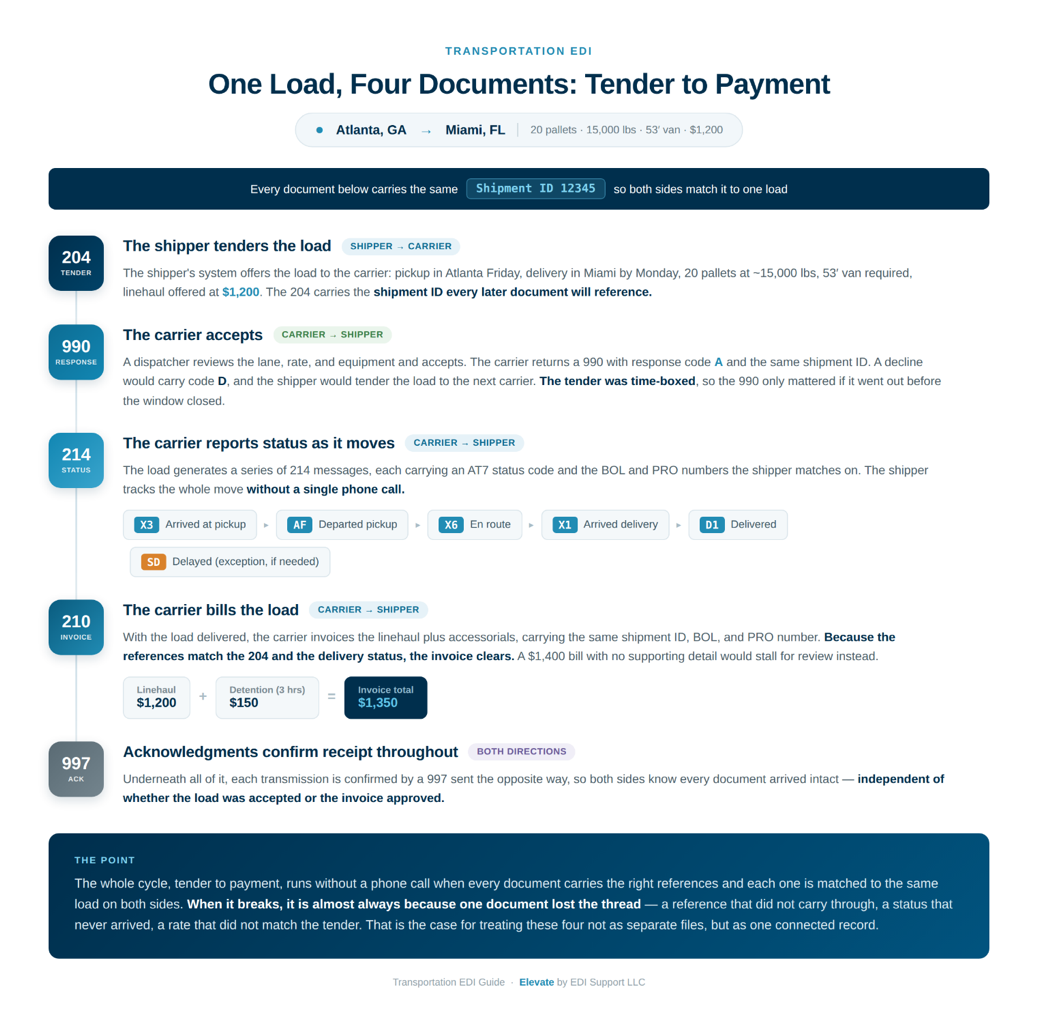
Transportation EDI Document Flow Example
The fastest way to understand how these documents fit together is to follow one load through all four. Here is a single truckload move, Atlanta to Miami, from the moment it is offered to the moment it is paid.
- The shipper tenders the load (204):
A shipper needs 20 pallets moved from a warehouse in Atlanta on Friday to a distribution center in Miami by Monday. Their system sends an EDI 204 to the carrier: pickup location and window, delivery location and window, 20 pallets at roughly 15,000 lbs, a 53-foot van required, and a linehaul rate of $1,200. The 204 carries a shipment ID the two parties will use to reference this load in every document that follows. - The carrier answers (990):
The carrier’s system receives the 204. A dispatcher reviews the lane, the rate, and available equipment, and accepts. The carrier sends back an EDI 990 with response code A and the same shipment ID, confirming they will haul the load as tendered. Had the dispatcher declined, the 990 would carry code D, and the shipper’s system would tender the load to the next carrier. Because the shipper’s tender was time-boxed, the value of that 990 depended on it going out before the window closed. - The carrier reports status as it moves (214).
The load now generates a series of EDI 214 messages, each carrying an AT7 status code:
Truck arrives in Atlanta to load → 214 with X3 (arrived at pickup)
Loaded and departing → 214 with AF (departed pickup)
On the road → 214 with X6 (en route), often with an estimated delivery
Arrives in Miami → 214 with X1 (arrival)
Freight delivered → 214 with D1 (delivery)
Each EDI 214 references the same shipment ID and carries the reference numbers the shipper requires to match it, typically the BOL and the carrier’s PRO number. The shipper’s system uses this sequence to track the load without a single phone call. If the truck were delayed, an exception 214 with SD would report it.
- The carrier bills the load (210).
With the load delivered, the carrier sends an EDI 210 invoice (that includes the $1,200 linehaul along with any accessorials say $150 in detention because the truck waited three hours at pickup). EDI 210 carries the same shipment ID, the BOL, and the PRO number, so the shipper can match the invoice against the original 204 and the delivery status. If the billed rate matches the tendered rate and the references line up, the invoice clears. If the 210 billed $1,400 with no supporting detail for the difference, it would stall for review. - Acknowledgments confirm receipt throughout (997).
Underneath all of this, each transmission is confirmed by a 997 in the opposite direction, so both sides know every document arrived intact — independent of whether the load was accepted or the invoice approved.
The whole cycle, tender to payment, can run without a phone call when every document carries the right references and each one is matched to the same load on both sides. When it breaks, it is almost always because one document lost the thread — a reference that did not carry through, a status that never arrived, a rate that did not match the tender. That is the practical case for treating these four not as separate files but as one connected record.
EDI 204: Motor Carrier Load Tender
An EDI 204 is a load tender: a shipper or broker offering a specific shipment to a carrier. It is the document that starts the relationship for a given load, and it carries everything the carrier needs to decide whether to haul it.
Direction: Shipper or broker to carrier (inbound for the carrier). In shipper and broker workflows the 204 is outbound.
What EDI 204 carries
A complete 204 describes the load in enough detail to accept or reject it without a phone call:
- Stops — pickup and delivery locations, in sequence, including multi-stop routes
- Dates and windows — when the freight is ready and when it is due
- Equipment — trailer type and size, such as a 53-foot van or a reefer
- Commodity and weight — what is shipping and how heavy it is
- References — the load or shipment ID, PO numbers, and other identifiers the parties will use to track the load
- Rate — in most cases the offered linehaul, though some tender models leave rate to negotiation
Key segments
The 204 is built from X12 segments. The ones that carry the load’s substance:
| Segment | Purpose |
| B2 | Beginning segment; carries the SCAC and the shipment identification number |
| B2A | Purpose of the transaction: original, update, or cancellation |
| L11 | Reference numbers such as PO, BOL, or load ID |
| N1 / N3 / N4 | Party name, street address, and city/state/ZIP for each stop |
| S5 | Stop-off details, sequenced, with weight and quantity per stop |
| N7 | Equipment description, including length and type |
| G62 | Dates and times for pickup and delivery |
Sample 204 (annotated)
A simplified 204 load tender. Each segment is labeled with what it carries.
| ST*204*0001~ | Transaction set header: this is a 204 |
| B2**SCAC**12345**123456~ | Shipment ID 12345, carrier SCAC |
| B2A*00*LT~ | Purpose 00 = original tender (LT = load tender) |
| L11*PO98765*PO~ | Reference: PO number 98765 |
| N7**5300*6000*G*******TV~ | Equipment: 53 ft trailer van (TV) |
| S5*1*CL*15000*L~ | Stop 1, complete load, 15,000 lbs |
| N1*SF*WAREHOUSE A~ | Ship-from party |
| N3*123 INDUSTRIAL WAY~ | Ship-from street address |
| N4*ATLANTA*GA*30303~ | Ship-from city, state, ZIP |
| G62*10*20250117~ | Pickup date 2025-01-17 |
| S5*2*CU~ | Stop 2, unload |
| N1*ST*DC MIAMI~ | Ship-to party |
| N4*MIAMI*FL*33101~ | Ship-to city, state, ZIP |
| G62*11*20250120~ | Delivery date 2025-01-20 |
| SE*15*0001~ | Transaction set trailer: 15 segments |
The B2A*00 is the segment to watch. A 00 marks an original tender; other purpose codes mark updates and cancellations, and a setup that ignores them will process a cancellation as though nothing changed.
Original, update, and cancellation
The B2A segment carries a purpose code that tells the receiver whether the 204 is an original tender, an update to a load already tendered, or a cancellation. This matters more than it looks. A setup configured only for original tenders can miss an update or cancellation, which is how a truck ends up dispatched to a load that was pulled. Purpose-code handling should be configured and tested per partner rather than assumed.
Where EDI 204 goes wrong
The most common problems are incomplete tenders and unhandled updates. A 204 missing a load number, a pickup, or a delivery cannot become a usable load, and the right behavior is to raise it for review rather than create a broken record and move on. Conflicting tenders like an update that clashes with an existing load should be caught and flagged, not silently written over the top of what was there. The distinction sounds academic until a silently overwritten tender puts a truck at the wrong dock; catching these at the point of import is what separates a system that manages loads from one that just parses files.
EDI 990: Response to a Load Tender
An EDI 990 is the carrier’s answer to a 204: accept or decline the tendered load. It is the shortest document in the set and the most time-sensitive, because the offer it answers usually has a deadline.
Direction: Carrier to shipper or broker (outbound for the carrier). In shipper and broker workflows the 990 is inbound.
Accept, decline, or conditionally accept
The 990 communicates the carrier’s decision through a response code in its beginning segment. The core outcomes:
|
Response |
Meaning |
|
A |
Accept — the carrier will haul the load as tendered |
|
D |
Decline — the carrier will not take the load |
|
Conditional / counter |
Where the partner supports it, the carrier proposes a change to terms |
Not every partner supports conditional responses; many treat the 990 as a straight accept or decline and handle changes with a fresh 204.
Key segments
|
Segment |
Purpose |
|
B1 |
Beginning segment; carries the SCAC, shipment ID, and the response code |
|
N9 / L11 |
Reference numbers linking the response back to the original tender |
|
G62 |
Confirmed or modified pickup and delivery dates |
Sample 990 (annotated)
The carrier’s response to the tender above. The 990 is short by design.
| ST*990*0001~ | Transaction set header: this is a 990 |
| B1*SCAC*12345*20250116*A~ | Shipment 12345, response A = accept |
| N9*PO*PO98765~ | Reference back to the tender's PO |
| SE*4*0001~ | Transaction set trailer: 4 segments |
The entire business meaning sits in one character: the A in the B1 segment. Change it to D and the same document declines the load. The N9 ties the response to the original 204 so the shipper’s system knows which tender was answered.
Why response time is the whole game
Response windows on load tenders are set by each shipper or broker and can be short. When a window closes, many tendering systems withdraw the offer and route the load to the next carrier automatically, often with no notification. This makes the 990 unlike most EDI documents: it cannot be a batch job you process when your workflow gets to it, because the offer is being measured against someone else’s clock. A system that polls for new documents infrequently can burn the entire window before anyone sees the tender, and the load is gone before a decision is ever made. How quickly a received 204 turns into a sent EDI 990 is the single most important thing to get right in a carrier setup.
EDI 990 is not EDI 997
This trips up a lot of new implementers. An EDI 997 is a functional acknowledgment that confirms a document arrived and parsed correctly; it says nothing about the business decision. An EDI 990 is the business response: yes or no to the load. A carrier receiving a 204 might send a 997 to confirm receipt and then a 990 to decline the load. Best practice is to use both, the 997 for technical receipt of every inbound document and EDI 990 specifically for the load-tender decision.
Rates flow from EDI 990 to EDI 210
Whatever rate and terms are agreed at the 990 stage should carry through to EDI 210 invoice at the end. When the invoice disagrees with what was accepted, it creates a dispute. This is the practical argument for keeping the tender, the response, and the invoice attached to one load record rather than scattered across three separate files: the mismatch is visible before it becomes a payment delay, because the agreed rate and the billed rate live in the same place.
EDI 214: Transportation Carrier Shipment Status Messa
An EDI 214 reports where a shipment is and what has happened to it. A carrier sends a series of 214s across the life of a load, each carrying a status code that tells the shipper the latest milestone or exception.
Direction: Carrier to shipper or broker (outbound for the carrier). In shipper and broker workflows the 214 is inbound.
The AT7 status code
The heart of the 214 is the AT7 segment, which carries the status code. The X12 standard defines dozens of them. In practice a small set does most of the work, and the exact meaning of each code is trading-partner specific — this is the single most important caveat on the whole document. Treat the table below as the common usage and confirm each code against the partner’s implementation guide.
|
Code |
Common usage |
|
X3 |
Arrived at pickup location |
|
AF |
Departed pickup location |
|
X6 |
En route |
|
AG |
Estimated delivery, or delivery-related status depending on partner |
|
X1 |
Arrival status; pickup or delivery depending on partner |
|
D1 |
At or completed delivery |
|
CD |
Carrier departed delivery / delivery complete |
|
AA |
Pickup or delivery appointment status |
|
A9 |
Shipment damaged (exception) |
|
A3 |
Shipment returned to shipper (exception) |
|
AH |
Attempted delivery (exception) |
|
SD |
Shipment delayed (exception) |
Partners do not read these identically: some use X1 for pickup arrival, others for delivery; AG and D1 vary in where they sit relative to actual delivery. An EDI 214 carrying the right code with the wrong meaning for that partner will misreport the shipment even though nothing technically failed. Confirm the codes and the required sequence per implementation guide.
Key segments
|
Segment |
Purpose |
|
B10 |
Beginning segment; shipment ID, SCAC, and reference |
|
LX |
Groups the status detail that follows |
|
AT7 |
The status code, reason, date, and time |
|
MS1 / MS2 |
Location: city, state, and equipment or carrier detail |
Reference qualifiers
An EDI 214 carries the reference numbers the receiver uses to match the right shipment. The common qualifiers:
- BM — bill of lading number
- CN — the carrier’s PRO number
- SI — shipper identification
- PO — purchase order number
Partners differ on which they require, and a 214 carrying the wrong reference may not match anything on the receiving side.
Sample 214 (annotated)
One 214 reporting departure from pickup. A real load produces several of these.
ST*214*0001~ Transaction set header: this is a 214
B10*12345*LOAD123*SCAC~ Shipment 12345, carrier reference, SCAC
LX*1~ Detail loop
AT7*AF***NS*20250117*0800*LT~ Status AF = departed pickup, 2025-01-17 08:00
MS1*ATLANTA*GA~ Location: Atlanta, GA
MS2*SCAC*TRAILER123~ Equipment: carrier and trailer number
SE*6*0001~ Transaction set trailer: 6 segments
The AT7 segment is the payload. The AF here is the status code; swap it for X3, X1, D1, or an exception code and the same structure reports a different milestone. The date and time in the AT7 are what the shipper uses to judge whether status was reported on time.
Completeness is graded, not just accuracy
Shippers judge status reporting on how complete and timely it is, and many track it on a carrier scorecard. Sending a delivered status with no pickup or in-transit events means the shipper had no visibility for the entire move, and that gap shows up on the scorecard even though every individual message was valid. The practical rule is to send the sequence of events the partner requires, not only the milestones that seem important. Status reporting is one place were doing the minimum and doing it correctly are not the same thing.
EDI 210: Motor Carrier Freight Details and Invoice
EDI 210 is the carrier’s freight invoice. It bills the linehaul plus any accessorial charges for the completed load, and it is the document that determines how fast the carrier gets paid.
Direction: Carrier to shipper or broker (outbound for the carrier). In shipper and broker workflows the 210 is inbound, and the party receiving it processes and matches it against the load.
What an EDI 210 carries
- Linehaul — the base freight charge for the move
- Accessorials — detention, layover, lumper, fuel surcharge, stop-off charges, and similar
- References — the load ID, BOL, and PRO numbers that tie the invoice back to the shipment and the original 204
- Weight and quantity — the billed shipment detail
Key segments
|
Segment |
Purpose |
|
B3 |
Beginning segment; invoice number, shipment ID, and net amount |
|
N1 |
Parties to the invoice |
|
L0 / L1 |
Line-item detail and the freight charge/rate breakdown |
|
L3 |
Total weight, charges, and summary |
EDI 210 must agree with EDI 204
The recurring theme of invoice problems is mismatch against the original tender. When an invoice is matched against the load it bills, by load number and available references, the failures cluster into a handful of causes:
|
Cause |
What is happening |
|
Rate mismatch |
The invoiced amount does not match the rate agreed at tender |
|
Missing references |
BOL, PRO, or shipment ID is absent or formatted differently than on the 204 |
|
Unauthorized accessorials |
Detention or layover billed without the required supporting detail |
|
Weight discrepancy |
Billed weight is outside tolerance against the tendered or scaled weight |
|
Duplicate invoice |
The same invoice number is submitted again after a correction |
|
Timing |
The invoice arrives before the delivery status, so there is nothing to match against yet |
Sample 210 (annotated)
The freight invoice for the delivered load.
ST*210*0001~ Transaction set header: this is a 210
B3**INV5001*12345**PP*1350***20250120~ Invoice 5001, shipment 12345, $1,350 prepaid
N1*SF*WAREHOUSE A~ Ship-from party
N1*ST*DC MIAMI~ Ship-to party
L11*PO98765*PO~ Reference: PO number, ties to the 204
L0*1***15000*N***1*PLT~ Line item: 15,000 lbs, 1 pallet group
L1*1***120000*****LNH~ Linehaul charge $1,200.00
L1*2***15000*****DET~ Detention charge $150.00
L3*15000*N***135000~ Totals: 15,000 lbs, $1,350.00
SE*10*0001~ Transaction set trailer: 10 segments
Note the L11 carrying the same PO that appeared on the 204 and the 990. That reference is what lets the shipper match this invoice back to the load it bills. The two L1 segments separate linehaul from the detention accessorial — when a 210 is rejected for an unsupported accessorial, it is usually because a charge like this arrived without the detail to justify it.
The pattern under all of these is the same: EDI 210 has to agree with EDI 204, and every mismatch is easier to catch when the invoice and the tender live on the same record instead of in two separate files. Some partner systems delay or reject an invoice without sending a detailed reason, so the ability to investigate from your own side to see the tender, the delivery status, and the invoice together is often what turns a stalled payment into a resolved one.
EDI 997: Functional Acknowledgment
An EDI 997 confirms that an EDI document arrived and parsed correctly. It is not a business response; it does not say a load was accepted or an invoice approved. It says only that the transmission was received intact and was structurally valid.
Direction: Both. Each party sends a 997 to confirm receipt of the documents it gets.
EDI 997 matters because most trading partners require it for every transmission and use it to reconcile what they sent against what you received. If a shipper sends a 204 and never gets a 997 back, they know the document did not land, independent of whether you later accept or decline the load. A common partner practice is to require 997s in both directions across all four documents and to use them to catch dropped transmissions early. Treat EDI 997 as the technical receipt layer underneath the business documents, not as a substitute for the 990.
Sample 997 (annotated)
A 997 acknowledging the 204 tender from earlier. It reports that the document was received and structurally valid.
ST*997*0001~ Transaction set header: this is a 997
AK1*SM*123456~ Acknowledging a 204 (SM = motor carrier load tender group)
AK2*204*0001~ The specific transaction being acknowledged
AK5*A~ Transaction accepted (A = accepted)
AK9*A*1*1*1~ Group accepted: 1 received, 1 accepted
SE*6*0001~ Transaction set trailer: 6 segments
The AK5 and AK9 segments carry the verdict. An A means the document was accepted at the syntax level; an R would mean rejected, with error codes identifying what failed. Note what the 997 does not say: nothing about whether the load was accepted. That decision belongs to the 990. The 997 only confirms the 204 arrived and parsed.
Connectivity: AS2, SFTP, VAN, and API
The four documents have to travel between systems, and transportation uses the same connectivity options as the rest of EDI. Which one a given relationship uses is set by the partner.
|
Method |
Common with |
Notes |
|
AS2 |
Large shippers, major brokers |
Direct and encrypted, certificate based. Certificates expire and must be renewed on a cycle |
|
SFTP |
Brokers, 3PLs, mid-size shippers |
The most common setup in transportation; simpler than AS2 and widely accepted |
|
VAN |
Legacy shipper relationships |
Still in use; a value-added network routes documents and can add per-character cost |
|
API |
Newer digital brokers |
Growing but inconsistent; many brokers run API and EDI in parallel rather than replacing one with the other |
One reality worth naming: a meaningful share of brokers still expect small carriers to accept tenders in a web portal rather than over EDI. That works at low volume and becomes a bottleneck as load count grows, because every tender is a manual login instead of a document your system can act on.
Testing and Go-Live: What to Expect
Every trading partner requires testing before they will send you live freight, and testing is where most onboarding time actually goes. The documents can be mapped correctly and still fail testing, because the partner is checking their specific requirements against a live exchange, not just valid X12.
Testing runs the full sequence, not one document at a time. A typical cycle with a shipper or broker:
|
Stage |
What happens |
|
Connectivity check |
Confirm documents can move both ways over the agreed AS2, SFTP, or VAN connection |
|
Inbound test |
The partner sends a test 204; you confirm it lands and creates a usable load |
|
Response test |
You return a 990 accepting or declining, in the format and timing they expect |
|
Status test |
You send 214 status events in the sequence the partner requires |
|
Invoice test |
You submit a 210 that matches the test tender’s rate and references |
|
Corrections and retests |
Failures are fixed and the affected documents are re-sent until they pass |
|
Sign-off |
The partner formally approves the setup and enables production |
The pattern that catches carriers off guard is that testing is gated by the partner, not by you. You can have every document ready and still wait days for the partner’s EDI team to review a test round. The technical work is rarely the bottleneck; partner review schedules are. This is why a single partner can take a couple of weeks and why onboarding several at once takes longer than the sum of the technical effort.
A few things that keep testing moving:
- Read the implementation guide before building, not during testing. Most failed test rounds trace back to a requirement that was in the guide all along — a qualifier, a required segment, a code the partner expects.
- Test the exceptions, not just the happy path. A setup that passes a clean load can still fail on a multi-stop tender, a cancellation, or an accessorial. Partners often test these deliberately.
- Keep one person accountable for the exchange. Testing stalls when nobody owns following up wi